AI productivity
Yield
A Chrome extension that tracks whether your AI outputs got used or had to be redone.
- My role
- Everything, from research to prototype
- Type
- Solo
- Time
- 5 weeks
- Made for
- Chrome extension and web app
- Tools
- Figma, Claude, ChatGPT
01 The problem
People use AI tools every day at work, but nobody tracks whether the output was actually useful or needed fixing. All that time spent reworking AI output goes unnoticed.
- 77%of workers say AI added to their workload
- 95%of AI pilots show no measurable return
- 6 to 10 hoursa month lost to fixing AI output
02 Research
I interviewed 9 people: founders, freelancers, team leads, new hires and designers. Six patterns came up:
- People pick AI tools out of habit, not logic.
- 60 to 70% of AI output gets rewritten, and nobody counts that as a cost.
- Managers can't see how their team uses AI.
- People pay for tools without checking if they use them.
- New hires get no guidance on the team's AI workflow.
- Nobody records what worked, so the same mistakes repeat.
“Reworking an AI output is normal. I don’t even see it as a cost.”
03 Who I designed for
I scored 5 user groups on their goals, needs and pain points. Freelancers scored highest, since they had the clearest need to track which tools actually help.
04 Getting to one idea
I wrote 6 problem statements, 90 How Might We questions and 450 ideas, grouped them into 12 clusters, and narrowed it down to one product.
- 6problem statements
- 90How Might We questions
- 450ideas
05 What Yield does
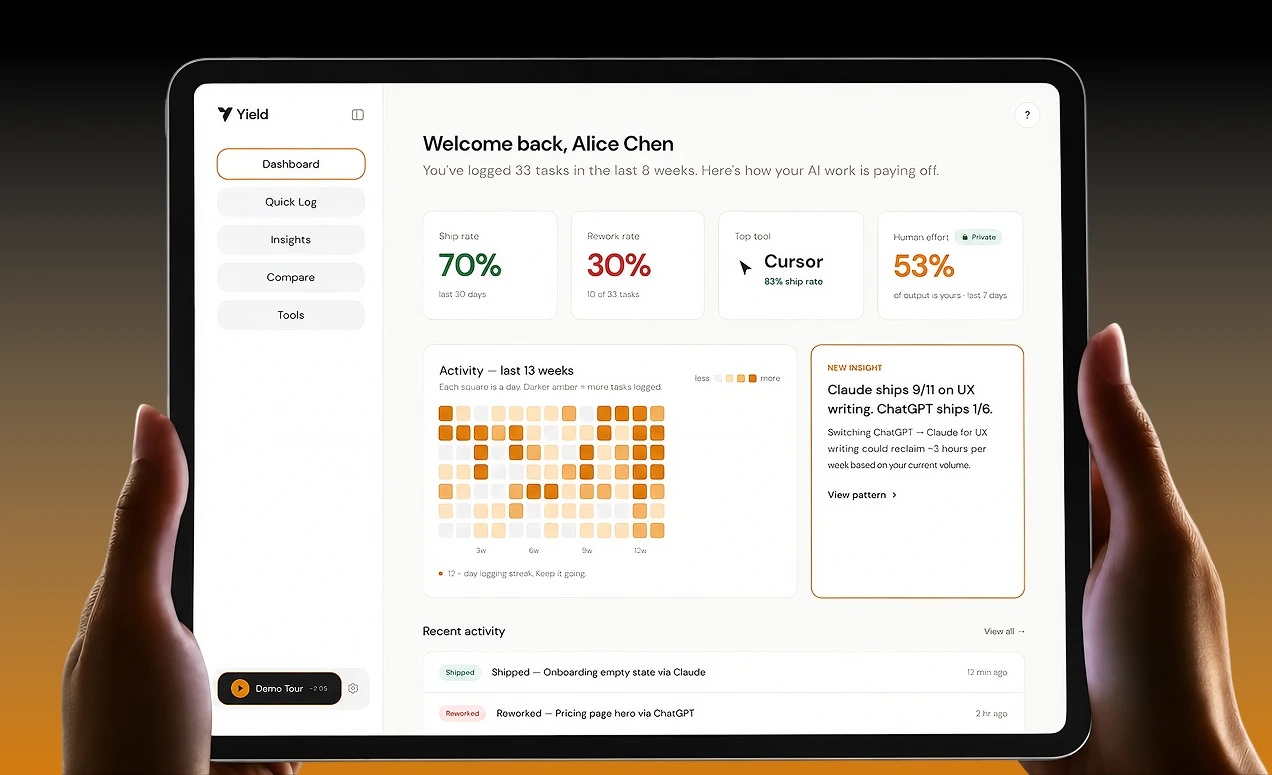
The Chrome extension logs each AI session, and the web app shows you patterns over time.
Quick Log
After an AI session, tap Shipped or Reworked. Takes about 10 seconds.
Confirm and Tag
A private slider for how much of the final work was yours vs the AI's. Only you can see it.
Insights
Patterns from your own work, like "Claude ships 9 of 11 on UX writing, ChatGPT ships 1 of 6."
06 Key decisions
- An extension, not just an app, so you log right when the session ends.
- “Reworked” instead of “Failed”, so it feels like a journal, not a report card.
- Time saved instead of money saved, so it motivates instead of guilt trips.
- Your effort split stays private, so nobody has a reason to fake it.
- Yield never reads or stores your prompts.
07 Prototype
27 screens built as a working HTML prototype. Every screen is clickable.
Try the prototype08 What I learned
The hardest part was stopping myself from building everything. Every time I cut a feature, the product got clearer.